

Quick Overview & First Impressions
The original Sony ZV-1 defined a genre. It took the powerful internals of the RX100 series and stripped away the photographer-centric features to build a purpose-made machine for YouTubers. The Sony ZV-1 II is the successor that promises to fix the biggest complaint of the original: the tight field of view.
Equipped with a new 18-50mm f/1.8-4 ZEISS Vario-Sonnar T* lens, the Mark II is significantly wider than the original’s 24-70mm lens. This means you can finally hold the camera at arm’s length and capture your whole face plus the background, rather than just your nose. It retains the beloved 1-inch stacked CMOS sensor, ensuring image quality remains leaps and bounds ahead of smartphones in complex lighting.
However, this wider lens comes at a controversial cost: the removal of Optical SteadyShot (OIS). Is the digital stabilization good enough to compensate? We spent weeks vlogging on city streets, shooting B-roll in coffee shops, testing low-light corridors, and comparing it side-by-side against the Canon G7X Mark III and the Sony ZV-1F to find out.
What’s in the Box
Sony continues its trend of eco-friendly, plastic-free packaging. The box feels almost like an egg carton material—sustainable, but not luxurious. Inside, you get the essentials, but notably, no charging brick.
- Sony ZV-1 II Camera Body
- NP-BX1 Rechargeable Battery Pack
- Microphone Wind Screen (The “Dead Cat”)
- Wind Screen Adapter
- User Manuals & Warranty Card
Note: There is no USB-C cable included, and no dedicated battery charger. Sony assumes—correctly for most of us—that you already have USB-C cables. You charge the battery inside the camera via the USB port. This is convenient for travel but means the camera itself is occupied during charging.
Sony ZV-1 II Vlog Camera
The definitive vlogging tool with a wider 18-50mm lens and intelligent microphone. Available in Black and White.
Check Current PriceDesign and Build Quality
If you have used the original ZV-1, the ZV-1 II will feel immediately familiar. It is incredibly compact, weighing just 292g with the battery and SD card included. It fits easily into a jacket pocket or a small sling bag, making it the ultimate “run and gun” camera.
The body is constructed from a composite polymer chassis with a rubberized grip texture. While it doesn’t have the cold, metallic premium feel of the RX100 series, it feels durable and resistant to everyday knocks. After months of daily shooting—tossed into bags, pulled out in the rain briefly, handled in sweaty palms during summer travel—the build held up without complaint.
Sony has moved the tripod mount thread away from the battery door—a massive quality-of-life improvement that allows you to swap batteries without unscrewing your tripod plate or shooting grip. This design decision alone makes the ZV-1 II more practical for daily shoots than the original.
The biggest physical change is the port selection. The ancient Micro-USB is finally gone, replaced by a robust USB-C port for charging, power delivery, and high-speed data transfer. The microphone input (3.5mm) and micro-HDMI ports remain on the side, but the headphone jack is still missing, which is a disappointment for audio monitoring on professional shoots.
Color Options
The ZV-1 II is available in two color variants: Classic Black and Glacier White. The white version has become particularly popular with beauty and lifestyle creators for its cleaner on-camera aesthetic. Both variants are identical in function, so the choice is purely aesthetic and personal.
Ergonomics and Handling
The ZV-1 II is designed to be held one-handed. The grip is small but functional. The recording button is large, prominent, and distinct from the shutter button, reducing the “did I press record?” anxiety. The tally light (a red LED on the front) is bright, ensuring you know when you are capturing footage even when the screen is flipped outward for self-shooting.
The dedicated Background Defocus button on the top plate is a stroke of genius for fast-paced vloggers. One press and the camera maxes out aperture for that creamy, subject-isolated bokeh look. Another press returns to a stopped-down, everything-in-focus travel mode. No menus, no fuss.
However, for extended vlogging sessions, the camera is best paired with the Sony GP-VPT2BT Wireless Shooting Grip. Holding the camera body itself can be cramping for large hands, and the grip adds stability, a zoom lever, and remote control that transforms the usability of the device. It also doubles as a compact tabletop tripod, which is invaluable for filming stationary tutorials or time-lapses.
Ergonomics play a huge role in your workflow. If you are editing hours of footage from this camera, your desk setup matters too. Check our guide on must-have gadgets for your home office to optimize your editing station.
Sensor Technology Deep Dive
Understanding what is actually inside this camera helps explain why it punches so far above its size and price class. The ZV-1 II uses a 1-inch Type (13.2 x 8.8mm) 20.1-megapixel Back-Illuminated (BSI) Stacked Exmor RS CMOS sensor. Let’s unpack what each of those terms actually means for your footage.
Back-Illuminated (BSI) Structure
Traditional sensors have wiring on top of the photodiode, blocking some light from reaching the pixel. Back-Illuminated designs flip this layout, placing the wiring behind the light-sensitive layer. The result is significantly improved light capture efficiency—translating to cleaner low-light images and better dynamic range without changing the physical sensor size.
Stacked CMOS Architecture
Sony’s “Stacked” design adds a second processing chip layer directly beneath the BSI sensor layer. This co-location of image processor and sensor dramatically reduces the distance data must travel, enabling faster readout speeds. The benefit you actually see: minimal rolling shutter distortion when panning, and faster continuous shooting rates. For vlogging while walking and talking, this means your footage of subjects and buildings doesn’t look like they’re made of rubber.
BIONZ X Processor
The BIONZ X image processor handles everything from noise reduction to autofocus calculations, color science, and video encoding. While some competitive cameras have moved to newer processors, the BIONZ X continues to deliver excellent results, particularly in its handling of skin tones—warm, natural, and flattering without artificial over-processing.
Image and Video Quality: The Power of 1-Inch
The heart of the ZV-1 II is its 20.1MP 1-inch Exmor RS CMOS sensor. This sensor is significantly larger than what you find in any smartphone, including flagship Pro models. The result is natural background blur (bokeh) and superior low-light performance that no computational photography algorithm can fully replicate.
Core Specifications at a Glance
The New Lens: 18-50mm ZEISS Vario-Sonnar T*
The 18mm wide end is the star of the show. At arm’s length, the original ZV-1’s 24mm cropped too tight, often cutting off your forehead or the scenery behind you. The ZV-1 II captures a perfect vlogging frame at 18mm — you can fit yourself and a friend in the shot comfortably without a gimbal or selfie stick. The ZEISS T* anti-reflective coating on the lens elements does a commendable job managing flare, even when shooting into bright windows or outdoor sunlight.
The lens incorporates a built-in 3-stop Neutral Density (ND) filter, which is a feature premium cameras often lack. Activating the ND filter outdoors lets you maintain the cinematic 180-degree shutter rule (shutter speed = 2× frame rate) even in bright conditions, giving your footage that natural, filmic motion blur rather than the stroboscopic, over-sharp look of footage shot at high shutter speeds.
The Trade-Off: The lens is slower at the telephoto end (f/4.0 at 50mm vs f/2.8 at 70mm on the original). This means zooming in reduces low-light capability and background blur. However, for vlogging at arm’s length, the wide angle is far more valuable than the extra stop of light at the long end.
4K Video Quality
The 4K footage from the ZV-1 II is detailed, punchy, and upload-ready with minimal editing. The oversampling process—where the sensor reads more pixels than the final 4K output requires—results in footage that looks noticeably cleaner and more detailed than cameras that simply upscale a lower-resolution read.
Color reproduction leans toward Sony’s characteristic slightly cool, accurate palette. Skin tones reproduce well in daylight. If you have ever envied the creamy, warm tones from Canon cameras, Sony’s color science is different but not worse—just a slightly different signature that many creators actually prefer for its neutrality and editing flexibility.
Still Photography Quality
While this is primarily a video camera, its still photography capabilities deserve acknowledgment. At 20.1 megapixels, the stills are sharp, well-exposed, and usable for social media and even moderate print sizes. The camera supports both JPEG and RAW (.ARW) formats, giving photographers the full dynamic range of the sensor for post-processing. For a vlogging trip where you also want to snap photos without carrying a second camera, the ZV-1 II performs admirably.
Low-Light Performance
The ZV-1 II’s ISO range runs from 100 to 12,800 in standard mode, expandable to 25,600 in stills mode. In practical shooting, ISO 3,200 produces clean, publishable footage with a hint of luminance noise but no disruptive color noise. ISO 6,400 remains usable, particularly for indoor vlogs under typical room lighting. Beyond that, noise becomes evident and grainy, but not catastrophically so—significantly better than any smartphone in the same conditions.
The f/1.8 maximum aperture at the wide end is a critical advantage in low light. Paired with the large 1-inch sensor, the ZV-1 II can shoot in dimly lit restaurants or event venues where smaller-sensor cameras struggle. The key distinction from smartphones in this scenario is not just exposure but quality of light capture—the bokeh remains natural, and fine details like hair and fabric texture are preserved rather than being mashed into a computational blur.
Slow Motion and Frame Rate Options
The ZV-1 II records up to 120fps at 1080p for smooth slow motion playback. At 4K, you are limited to 30fps (or 25fps in PAL regions). The 1080p/120fps mode produces clean, detailed slow motion that is more than adequate for creative vlog inserts—a dramatic slow-mo pour of coffee, a product unboxing reveal, or an action moment in a travel vlog.
It is worth noting that 4K/60fps is absent, which is a genuine gap compared to some competitors and Sony’s own higher-end ZV lineup. For creators who need smooth 4K footage of fast-moving subjects like sports or events, this is a limitation. For the core talking-head and lifestyle vlogging audience, 4K/30fps is more than sufficient, and 1080p/60fps provides perfectly fluid footage for fast pans and action sequences.
Complete Video Mode Reference
- 4K (3840×2160) @ 30/25/24fps
- 4K (3840×2160) @ 30/25/24fps (CinemaScope crop)
- 1080p (1920×1080) @ 60/50/30/25fps
- 1080p (1920×1080) @ 120fps (slow motion)
- 720p @ 30/25fps (proxy/webcam)
- XAVC S (codec for all above)
S-Log3, S-Gamut3.Cine & Color Profiles Explained
One of the most underrated features of the ZV-1 II is its support for Sony’s S-Log3 and S-Gamut3.Cine picture profiles. These are the same logarithmic color profiles used on Sony’s Cinema Line professional cameras costing twenty times the price.
In S-Log3, the camera captures a flat, low-contrast, desaturated image that contains significantly more dynamic range information than a standard “baked-in” color profile. This gives you tremendous flexibility in post-production to apply color grades, adjust shadows and highlights independently, and craft a specific cinematic look. If you have ever seen a YouTube video with that rich, teal-and-orange grade that makes ordinary locations look like movie sets—it almost certainly started as S-Log3 footage.
Creative Looks (for Beginners)
If color grading is not in your workflow, the Creative Looks feature offers 10 pre-baked in-camera styles: ST (Standard), PT (Portrait), NT (Neutral), VV (Vivid), VV2 (Vivid 2), FL (Film), IN (Instant), SH (Shiny), BW (Black and White), and SE (Sepia). Each can be further fine-tuned for contrast, saturation, and sharpness. Combined with the Cinematic Vlog Setting (2.35:1 aspect ratio, 24fps), you can produce distinctly cinematic-looking footage straight from camera with zero post-processing.
Cinematic Vlog Setting
The Cinematic Vlog Setting locks the aspect ratio to 2.35:1 (CinemaScope) and sets the frame rate to 24fps, instantly giving your footage a movie-like look with black bars at the top and bottom of the frame. It is a fun, one-touch way to elevate B-roll that requires no technical knowledge—ideal for travel vloggers who want their footage to feel premium without spending hours in editing software.
Autofocus Performance: Sony’s Superpower
Sony’s autofocus is, quite simply, among the best in the industry at this price point. The ZV-1 II features a hybrid autofocus system combining 315 phase-detection points and 425 contrast-detection areas. In practice, this translates to autofocus that acquires a subject in under 0.03 seconds and tracks it with a tenacity that feels almost aggressive—in a good way.
Real-time Eye AF and Real-time Tracking are the headlining features. Eye AF locks onto your eye and refuses to let go, even if you turn away, step sideways, or move erratically in a casual walking vlog. When multiple people enter the frame, the camera maintains its focus lock on the subject you initially selected rather than jumping to whoever is now closest.
Animal Eye AF works surprisingly well for pet-focused content creators—the camera can lock onto a dog or cat’s eye with the same precision it applies to humans. For pet vloggers or family content creators, this removes one of the most frustrating pain points of compact camera autofocus.
Product Showcase Setting
The Product Showcase mode is a game-changer for reviewers, beauty creators, and educators. When enabled, the camera prioritizes objects held closer to the lens. If you hold a lipstick, gadget, book, or food product up to the camera, focus snaps to it instantly. Drop your hand, and focus snaps back to your face. No other manufacturer has implemented this feature as seamlessly, and it removes the single most disruptive autofocus failure mode in product review content.
The transition speed between face and product focus is adjustable between three settings: Fast, Medium, and Slow. For dramatic unboxing reveals, Slow creates a cinematic rack focus effect. For tutorial content where you rapidly alternate between demonstrating something and speaking to camera, Fast keeps the viewer’s eye where it needs to be.
High-quality video requires high-quality editing. Once you have captured your footage, use AI to speed up your workflow. See our list of 10 best AI tools to automate tasks including video editing.
Stabilization In-Depth: The Elephant in the Room
This is where it gets complicated, and we want to give you a fully honest assessment. The original ZV-1 had Optical SteadyShot (OIS)—physical lens elements that moved to counteract camera shake. This was not just marketing; OIS makes a measurable, visible difference, particularly for still photography and gentle video movement.
The ZV-1 II removes OIS entirely. It relies solely on Active Mode electronic/digital stabilization. This crops the image slightly—at 18mm, Active Mode changes the effective focal length to approximately 21mm equivalent—to create a buffer of pixels that the camera shifts digitally to smooth out movement.
Does Active Mode Work?
For most vlogging scenarios, yes. Walking at a normal pace while talking to camera produces smooth, watchable footage—the kind of result the original ZV-1 could only achieve with Active Mode engaged and its subsequent crop. The ZV-1 II manages this more gracefully because it starts with a wider base focal length.
Where Active Mode falls short is during purposeful walking with footsteps—urban environments with pavement impacts, stairs, and uneven terrain. The footage from these situations has a recognizable “floaty but not perfect” quality that trained eyes can spot. A gimbal like the DJI OM 6 or the Sony GP-VPT2BT grip (for static shots) can address this completely.
Active Mode OFF vs ON Comparison
When Active Mode is disabled, you get the full 18mm field of view but with raw, uncompensated shake. For tripod or gimbal shooting, turning Active Mode off is recommended to preserve the widest angle and best image quality. For handheld moving shots, keeping it on is the practical choice despite the slight crop.
Audio and Microphone Quality
The ZV-1 II features an upgraded Intelligent 3-Capsule Microphone. Unlike the original, this mic allows you to change the directionality manually. You can set it to capture audio from the Front (vlogging toward camera), Rear (narrating while shooting away from camera), or All Directions (ambient environment). There is also an “Auto” mode that switches based on face detection—particularly clever for situations where you are sometimes talking to camera and sometimes narrating action in front of you.
The audio quality in quiet-to-moderate environments is surprisingly robust—clear, warm, and usable without an external mic. The included “dead cat” wind screen effectively cuts out wind noise outdoors up to moderate breezes. In wind speeds above roughly 20 km/h, some low-frequency rumble begins to intrude, at which point an external directional mic becomes necessary.
External Microphone Options
The 3.5mm TRS microphone jack accepts any standard external microphone. The Multi Interface Shoe on top supports Sony’s cable-free digital microphones—specifically the ECM-B10 compact shotgun and the ECM-G1 vlogging microphone—without any cables cluttering the shot. For run-and-gun creators, the ECM-B10 adds exceptional directional audio that completely transforms the professional feel of the footage, all in a package barely larger than a lipstick.
Wireless Microphone Compatibility
The ZV-1 II is compatible with Sony’s ECM-W2BT wireless microphone system via the Multi Interface Shoe receiver. Wireless systems like the DJI Mic and Rode Wireless GO II connect through the 3.5mm input with an included adapter. The camera’s preamp handles these signals cleanly with minimal noise floor, making wireless lavalier setups practical and professional-sounding.
Screen, Controls and Interface
The fully articulating 3-inch 921k-dot touchscreen flips out to the side for front-facing self-shooting and rotates through multiple angles for creative low-angle and overhead shots. Sony has completely overhauled the touch interface. You can now control almost everything via touch icons on the screen, similar to a smartphone interface—including starting and stopping recording, activating Product Showcase mode, triggering self-timer, and switching between photo and video modes.
This redesigned touch UI makes the ZV-1 II dramatically more accessible for creators upgrading from a smartphone. The infamous Sony “Menu Labyrinth” still exists in the depths of the settings menu, but for everyday shooting operations, you may never need to venture there.
Screen Brightness and Outdoor Visibility
The screen reaches a maximum brightness of approximately 1200 nits in High Luminance mode, which is adequate for bright shade but can struggle in direct overhead sunlight. Unlike some premium cameras, there is no electronic viewfinder (EVF) as a fallback, so be aware that bright outdoor shooting may occasionally require you to shade the screen with your hand or rely on compositional muscle memory.
Customizable Buttons
Despite its compact size, the ZV-1 II has three customizable buttons that can be assigned from a menu of 60+ functions. Recommended assignments for vloggers: C1 for ISO override, C2 for White Balance adjustment, and C3 for switching between video and photo recording mode. Setting up My Menu with your five most-used settings takes ten minutes and saves hours of menu diving over the life of the camera.
Connectivity and Features
The camera connects to the Sony Creators’ App (formerly called Imaging Edge Mobile) via Wi-Fi and Bluetooth. Transferring photos and videos to your smartphone is faster and more stable than previous generations, making end-of-day social media upload workflows nearly seamless. The Creators’ App also functions as a full remote control, letting you adjust settings, trigger recording, and review footage from your phone—essential for solo tripod setups where you need to start recording without touching the camera.
NFC (near-field communication) is also present for instant single-tap pairing with NFC-enabled Android devices.
Webcam and Live Streaming Use
One of the most underutilized features of the ZV-1 II for many buyers is its ability to function as a high-quality webcam via USB-C. Connect it to a PC or Mac, and the camera appears as a UVC (USB Video Class) device—meaning no drivers, no capture card, and no additional software are required. It streams at 720p/30fps over USB, which represents an enormous upgrade over any built-in laptop webcam.
For Zoom calls, Teams meetings, podcasts, or Twitch streams from a desk, the combination of the 1-inch sensor’s depth of field and the natural color reproduction makes participants look dramatically more professional and well-lit compared to a webcam.
Battery Life and Storage
The Achilles’ heel of the ZV-1 series remains the NP-BX1 battery. It is physically tiny. You will get about 45 to 60 minutes of continuous 4K recording. In real-world shooting (powering on and off between clips, reviewing footage), expect it to last two to three hours of active shooting before you need to swap.
The USB-C Power Delivery support is the saving grace. Connect any USB-C PD power bank (rated at 9V/2A or higher) to the camera’s USB-C port, and the camera will power itself from the bank while simultaneously charging the internal battery. This means theoretically unlimited runtime for stationary setups like time-lapses, livestreams from a desk, or long interviews.
Recommendation: Buy at least two extra NP-BX1 batteries alongside the camera. Third-party options offer comparable capacity at a fraction of the price.
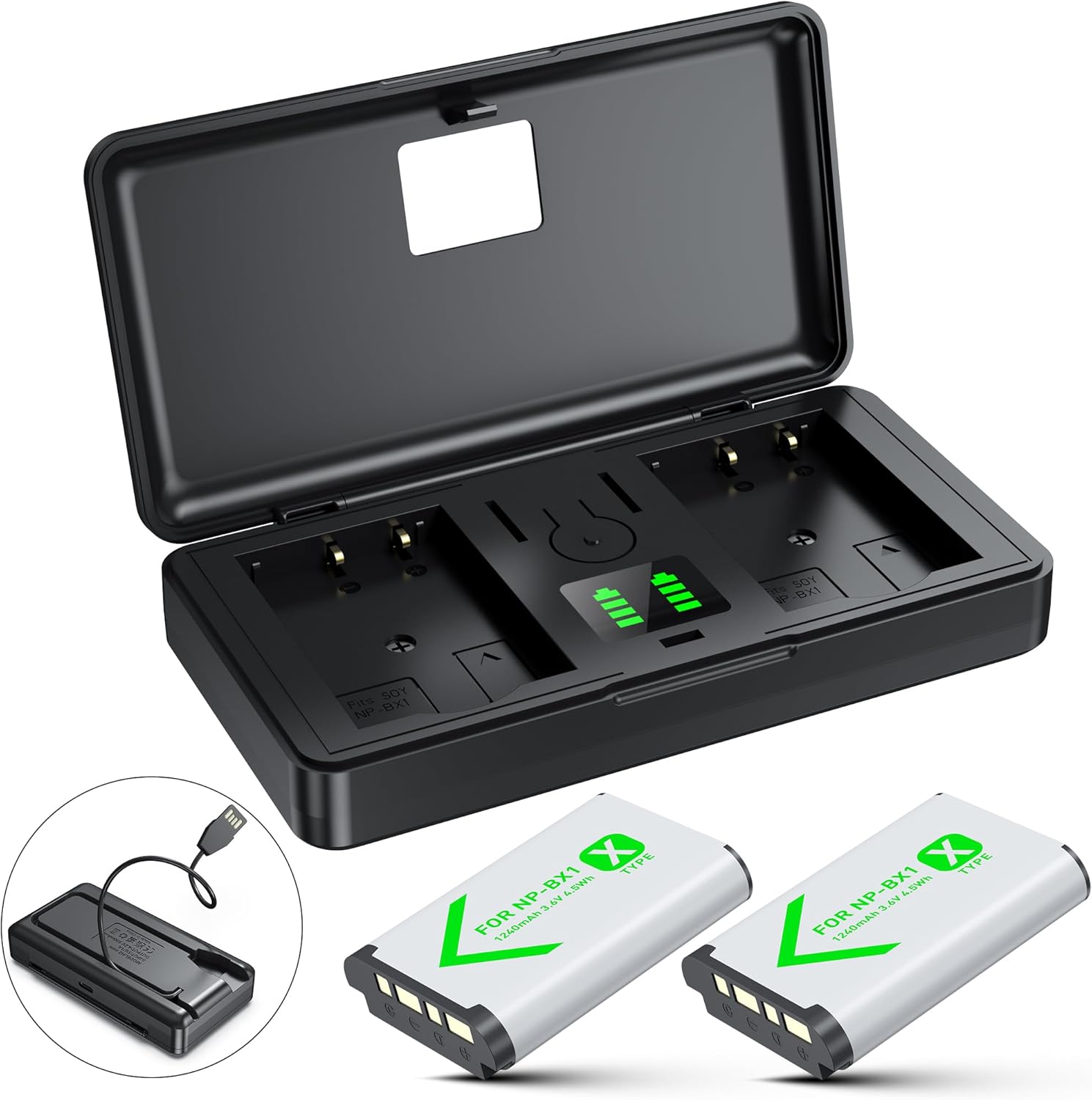
Essential Accessory: Wasabi Power Kit
Two extra batteries and a dual charger for a fraction of the Sony price. Never miss a shot because of a dead battery again.
Get Extra PowerMemory Card Recommendations
The ZV-1 II uses a single SD card slot supporting UHS-I speeds. For 4K recording, you need a card rated at least V30 (Video Speed Class 30), which guarantees a minimum sustained write speed of 30MB/s. Recommended options are the Samsung PRO Endurance (designed for continuous recording durability) and the Sony SF-G Tough series (weather-resistant and physically robust). Avoid generic “Class 10” cards without V30 rating for video—they may work intermittently but can cause recording interruptions mid-shoot.
Camera gear can be expensive. If you are saving up for this setup, use our zero-based budget checklist to manage your finances effectively.
Best Settings for Vlogging with the Sony ZV-1 II
Out of the box, the ZV-1 II’s automatic modes are genuinely excellent and will serve most creators well for daily shooting. However, dialing in a few key settings transforms the camera from good to exceptional.
Recommended Video Settings
- Format: XAVC S 4K, 30fps (or 25fps for PAL regions)
- ISO: Auto ISO with upper limit set to 3200
- Shutter Speed: Double your frame rate (60 for 30fps) — use the ND filter in bright conditions to maintain this
- White Balance: Auto (lock it if shooting in mixed lighting by pressing and holding the WB button during good lighting)
- Picture Profile: PP4 (S-Log3/S-Gamut3) for maximum edit flexibility, or leave on Standard for upload-ready footage
- Stabilization: Active Mode ON for walking, OFF for tripod/gimbal use
- Face/Eye Priority: ON — absolutely never turn this off for vlogging
- Autofocus Sensitivity: 3 (middle) — less jumpy than maximum sensitivity in busy environments
Recommended Photo Settings
- Format: RAW + JPEG Fine (maximum quality)
- Drive Mode: Continuous Shooting Hi+ for action moments
- Focus Mode: Continuous AF with Tracking
- Creative Look: FL (Film) or VV2 for social-ready JPEGs
Must-Have Accessories
The ZV-1 II is a capable standalone camera, but the right accessories can transform it into a professional-level content creation setup. Here are the accessories that make the most meaningful difference.
Sony GP-VPT2BT Wireless Shooting Grip
The official Sony grip serves triple duty as a handheld stabilizer, Bluetooth remote trigger, and compact tripod. The zoom lever on the grip side means you never have to reach around the camera body to adjust focal length while recording. Essential for solo creators who set the camera down frequently between shots.
DJI OM 6 or Hohem iSteady M6 Gimbal
If walking footage is central to your content—travel vlogs, street interviews, event coverage—a smartphone-class gimbal adapted for compact cameras solves the stabilization limitation definitively. The DJI OM 6 supports the ZV-1 II’s weight with a simple bracket adapter and delivers buttery-smooth 3-axis stabilization.
External Microphone: Sony ECM-B10
The built-in mics are good. The ECM-B10 is better by a significant margin—tighter pickup pattern, lower noise floor, and better wind rejection. It attaches to the Multi Interface Shoe with no cables for a clean setup.
Compact LED Light: Lume Cube Edge
The 1-inch sensor handles low light well, but a small LED panel gives your face dimension and catch light that makes the difference between amateur and professional-looking talking head footage. The Lume Cube Edge mounts to the ZV-1 II via a cold shoe adapter on the Sony grip.
Extra Memory Cards
Keep at least two V30-rated SD cards in rotation. Running out of storage mid-shoot or spending time managing a single card creates unnecessary friction in your workflow.
Competitor Comparisons
The Sony ZV-1 II exists in a competitive landscape that includes cameras from Canon, Nikon, and Sony’s own broader ZV range. Here is how it stacks up against the most relevant alternatives.
| Feature | ZV-1 II | ZV-1F | Canon G7X III | ZV-E10 | Nikon Z30 |
|---|---|---|---|---|---|
| Sensor Size | 1-inch | 1-inch | 1-inch | APS-C | APS-C |
| Lens | 18-50mm f/1.8-4 | 20mm f/2 fixed | 24-100mm f/1.8-2.8 | Interchangeable | Interchangeable |
| 4K Video | 4K/30p ✓ | 4K/30p ✓ | 4K/30p ✓ | 4K/30p ✓ | 4K/30p ✓ |
| 1080/120fps | ✓ | ✓ | ✗ | ✓ | ✓ |
| Optical Stabilization | Digital Only | Digital Only | OIS ✓ | IBIS optional | VR in lens |
| Flip Screen | Articulating ✓ | Flip up ✓ | Articulating ✓ | Flip up ✓ | Vari-angle ✓ |
| Headphone Jack | ✗ | ✗ | ✓ | ✓ | ✗ |
| USB-C Charging | ✓ | ✓ | ✗ (Micro-USB) | ✓ | ✓ |
| Product Showcase AF | ✓ | ✓ | ✗ | ✗ | ✗ |
| S-Log3 Support | ✓ | ✗ | C-Log ✓ | ✓ | N-Log ✗* |
| Pocketable | ✓ (292g) | ✓ (256g) | ✓ (304g) | ~343g + lens | ~350g + lens |
Sony ZV-1 II vs Sony ZV-1F
The ZV-1F is Sony’s budget-focused entry in the ZV lineup, featuring a fixed 20mm f/2 lens with no optical zoom whatsoever. At roughly $100-150 less than the ZV-1 II, it is an appealing option for absolute beginners, but the ZV-1 II is the better long-term investment for serious creators.
The ZV-1F’s fixed 20mm lens is excellent for selfie vlogging but severely limiting for any scenario requiring zoom—product close-ups, wildlife glimpses during travel, a speaker at the other end of a room. The ZV-1 II’s 18-50mm range covers all of these without changing your setup. Additionally, the ZV-1 II’s S-Log3 support, which the ZV-1F lacks, is an important feature for creators who want to develop a distinct visual style with color grading.
Sony ZV-1 II vs Canon PowerShot G7X Mark III
The Canon G7X Mark III is the ZV-1 II’s most direct competitor and the alternative most commonly cross-shopped. Canon’s camera offers a 24-100mm f/1.8-2.8 lens—longer zoom range at a faster aperture throughout—optical image stabilization, a headphone jack for audio monitoring, and direct YouTube live streaming built into the camera.
However, the G7X Mark III uses Micro-USB charging (still, in this era), lacks the Sony-exclusive Product Showcase autofocus mode, does not support S-Log3 at the same level of implementation, and its autofocus tracking, while competent, is a visible step behind Sony’s Real-time Tracking system.
For creators who prioritize stabilization and audio monitoring: Canon G7X Mark III. For creators who prioritize autofocus excellence, modern USB-C connectivity, the widest possible angle, and S-Log3 color science flexibility: Sony ZV-1 II.
Sony ZV-1 II vs Sony ZV-E10
The ZV-E10 is Sony’s APS-C interchangeable lens vlogging camera. With its larger sensor, the ZV-E10 offers better low-light performance, shallower depth of field at equivalent apertures, and the flexibility to swap lenses for different creative looks. For the price of the ZV-1 II plus its kit lens (Sony E 16-50mm f/3.5-5.6), the total cost is similar.
The ZV-1 II wins on compactness, simplicity, and the lens quality-to-size ratio. The ZV-E10 cannot fit in a jacket pocket with a lens attached. For creators who want to travel light and never need to think about which lens to pack, the ZV-1 II’s all-in-one convenience is its defining advantage. For creators building a more versatile kit over time and willing to carry slightly more, the ZV-E10’s expandability offers better long-term value.
Who Is This Camera For?
The Sony ZV-1 II is not a camera for everyone. It is a very specifically engineered tool for a specific type of creator, and understanding whether you are that creator is the most important purchasing decision you can make.
The Lifestyle Vlogger: If you film “day in the life” content, the wide 18mm lens makes this the best camera in its class. You can walk and talk without worrying about framing.
The Beauty YouTuber: The Product Showcase mode and Soft Skin Effect are features specifically engineered for this niche. No competing camera in this form factor offers both.
The Smartphone Upgrader: If you want better low-light performance and natural depth of field but do not want to learn manual photography, the ZV-1 II bridges that gap with its fully automatic modes that are genuinely excellent.
The Travel Content Creator: Lightweight, pocketable, wide-angle, with long battery life supplemented by power bank support. Perfect for destination content.
The Food and Lifestyle Blogger: Point-and-shoot simplicity, appetizing color science for food photography, and 4K video for recipe tutorials combine effectively in this small package.
Real-World Use Cases
Travel Vlogging
The ZV-1 II’s compact size makes it the ideal travel vlog camera for creators who are carrying luggage through airports and want to document their journey without drawing attention. The 18mm wide angle captures context naturally—a street market, a hotel room tour, a panoramic landscape with you in the foreground. The built-in ND filter handles bright beach and mountain light elegantly without requiring manual intervention. Our testers used it for a two-week trip across Southeast Asia and returned with 4K footage that required minimal color correction and zero excuses for missed shots.
Studio and Desk Setup Tutorials
For stationary content—desk setups, tutorial walkthroughs, podcast-style discussions—the ZV-1 II is outstanding. On a tripod at arm’s length, the face fills the frame naturally at the 18mm setting. The Product Showcase mode transforms screen share demonstrations and desk review content. Run the camera from a USB-C power bank for unlimited recording sessions without battery anxiety.
Food and Recipe Content
Overhead food shots at 50mm produce the soft, subject-isolated close-ups that make dishes look irresistible. The manual aperture control lets you dial in the exact depth of field for each dish—sharp on the hero ingredient, softly falling off in the background. The articulating screen makes above-table framing intuitive. Combined with a top-down mount, this is a powerful tool for food vloggers.
Fitness and Workout Content
Using the GP-VPT2BT grip as a tabletop tripod, fitness creators can set the camera low to the floor, angle it upward, and capture wide workout demonstrations with the entire body in frame even in small spaces. The Active Stabilization mode handles dynamic movement sequences without a gimbal for shorter demonstration clips.
Creating content often requires travel. Whether you are vlogging abroad or locally, make sure you are prepared. Our packing list for a 10-day trip ensures you don’t forget essential gear.
Score Breakdown
Pros and Cons
- 18mm Wide Lens: Perfect for handheld vlogging and group selfies.
- Autofocus: Unmatched Real-time Eye AF and Product Showcase mode.
- Microphone: Intelligent 3-capsule mic with switchable directional modes.
- USB-C: Modern charging, power delivery, and easy webcam use.
- Size: Genuinely pocketable at 292g.
- ZEISS Lens: T* coating, built-in ND filter, smooth silent zoom.
- S-Log3 Support: Professional color grading flexibility.
- Touchscreen UI: Accessible for smartphone upgraders.
- Cinematic Vlog Mode: One-touch CinemaScope with 24fps.
- Animal Eye AF: Tracks pets and wildlife.
- No OIS: Relies solely on digital Active Mode stabilization.
- Battery Life: 45-60 minutes of continuous 4K recording.
- No Headphone Jack: Cannot monitor live audio levels.
- No 4K/60fps: Competitors and even budget smartphones offer this.
- Plastic Build: Feels less premium than the RX100 series.
- Slow Telephoto Aperture: f/4.0 at 50mm limits low-light zoom.
- No EVF: Screen-only in bright outdoor light can be challenging.
- Price Premium: Higher cost than the original’s launch pricing.
Final Verdict
The Sony ZV-1 II is a masterclass in listening to customer feedback. Sony realized that for vloggers, a wider lens is more important than a telephoto zoom or optical stabilization. By shifting to 18-50mm and implementing a full-touch interface, they have created a camera that captures your world more naturally and operates more intuitively than its predecessor.
While the lack of optical stabilization, the abbreviated battery life, and the absence of a headphone jack are genuine compromises, the combination of the 1-inch sensor, industry-leading autofocus, S-Log3 support, and an intelligent multi-directional microphone makes this the current benchmark for compact vlogging cameras.
It is the right tool for creators who want to elevate their content significantly above smartphone quality without the weight, complexity, or cost of a mirrorless setup. The compromises are real—but they are the right compromises for the target audience.
Frequently Asked Questions
Is the Sony ZV-1 II good for photography?
Yes, but with caveats. It takes excellent 20MP photos in RAW and JPEG thanks to the 1-inch sensor, and the autofocus is excellent. However, it lacks an electronic viewfinder, a built-in flash, and its ergonomics are designed primarily for video. For hybrid shooters, the RX100 VII might be a better all-rounder.
Does it overheat when recording 4K?
Sony has improved heat management in the ZV-1 II. In “High Temp” mode, you can record 4K for approximately 30 to 40 minutes continuously indoors. In direct sunlight or warm environments, this may be shorter, but the camera is generally reliable for standard vlog clips of five to fifteen minutes at a time.
Can I use an external microphone?
Yes. It has a standard 3.5mm TRS microphone input for any standard mic. It also has the Multi Interface Shoe (MI Shoe) on top, which supports cable-free digital microphones from Sony such as the ECM-B10 and ECM-G1, as well as third-party adapters for MI Shoe.
Is it waterproof or weather-sealed?
No. The ZV-1 II has no weather-sealing. Do not use it in rain without protection or an underwater housing. For water-adjacent activities, keep it in a padded bag until you are ready to shoot, and avoid humid or wet environments without a protective case.
Is it worth upgrading from the original ZV-1?
If you find the original lens too tight for handheld vlogging, the 18mm lens is a substantial real-world improvement. The USB-C port, improved touch interface, and Cinematic Vlog mode are also meaningful additions. If you primarily shoot stationary content on a tripod, the original ZV-1 is still capable and the upgrade may not justify the cost.
What SD card should I use with the ZV-1 II?
Use a UHS-I SD card with at least V30 (Video Speed Class 30) rating for reliable 4K recording. Recommended brands include Sony (SF-G series), Samsung (PRO Endurance for continuous recording), and SanDisk (Extreme Pro). Avoid unrated or generic cards which risk dropped frames during recording.
Can I use the ZV-1 II as a webcam?
Yes. Connect it via USB-C to a PC or Mac and it works as a plug-and-play UVC webcam at 720p/30fps with no drivers required. For higher resolution streaming, use the micro-HDMI output with a capture card to achieve up to full HD or 4K clean HDMI output.
Does the ZV-1 II support vertical video for TikTok and Reels?
The camera itself records in landscape (16:9) orientation. For vertical social content (9:16), you can physically rotate the camera to portrait orientation while vlogging—the screen rotates its display to match. Alternatively, shoot in standard landscape and crop to vertical in post. The 20MP sensor provides enough resolution to crop a vertical 9:16 frame from a horizontal 4K video without significant quality loss.
How does it compare to shooting on an iPhone or flagship smartphone?
In good daylight, flagship smartphones have narrowed the gap significantly through computational photography. In challenging conditions—dim indoor lighting, harsh backlit scenes, situations requiring natural bokeh—the ZV-1 II’s 1-inch sensor still delivers noticeably more natural, more detailed, and less processed-looking footage. The autofocus tracking and color science are also distinct advantages that become apparent in longer-form video content.
Is the ZV-1 II good for streaming on Twitch or YouTube Live?
Via USB-C for webcam use, yes—it streams at 720p/30fps natively. For higher-quality streaming, use the clean HDMI output with a capture card to stream at 1080p/60fps or 4K. The built-in microphone is adequate for casual streams; for serious streamers, pair it with an external USB or MI Shoe mic. Unlike some point-and-shoot cameras, the ZV-1 II does not display any overlays or menus on the HDMI output when set to Clean HDMI mode.